
You can start checking what happened now. Removing an app cannot undo information already sent or account damage. If a step is difficult, ask the appropriate support provider rather than continuing alone.
Do this now, from the top
- 1
Disconnect temporarily and read this on another device
If remote control or data transmission is a concern, enable aeroplane mode and check in Settings that Wi-Fi and Bluetooth are also off. Aeroplane mode alone does not guarantee Wi-Fi is off. Use another trusted device for guidance and support.
- 2
Record the app name, installation time and your actions
Use the app list in Settings without reopening the suspicious app. Note the message that led you there, permissions you granted and types of information entered. Do not write actual passwords or card numbers in your support notes.
- 3
Use the Android or iPhone section below
Follow the section for your OS. For a work, school or parent-managed phone, contact the administrator before changing management settings. A missing delete button is not a reason to disable every protection.
- 4
Address exposed information and payments separately
If you entered credentials or shared your screen, use another trusted device to check the account through its official service. Contact your financial institution about card or transfer losses. Use the linked guides for exposed information, payments or account hijacking.
- 5
Ask the manufacturer if removal fails or problems continue
Ask the manufacturer or carrier about device operation and resetting. Before a reset, check your data backups, account sign-in and authenticator recovery. Japan’s IPA provides security advice but does not investigate individual devices or teach basic phone operations.
Official documentation checked: September 7, 2026. Menu names vary by OS version, manufacturer and management settings. The path diagrams are schematics; the iPhone image is from Apple support. These steps have not been tested on a physical phone by this site.
Android: remove the app and check permissions
Open Settings, then Apps (or Apps & notifications), and the full app list. Select the app and Uninstall. Do not confuse disabling an app with uninstalling it.
If you cannot remove it
If the screen reports device administration or a work profile, ask the administrator or manufacturer. Do not remove work or family management settings indiscriminately. For freezes or overlays that prevent operation, ask the manufacturer about safe mode; Pixel instructions do not apply to every Android phone.
For a Pixel 6 or later, Google describes opening the power menu with Power and Volume Up, then holding Power off or Restart and choosing OK. Safe mode can remove home-screen widgets. It is a troubleshooting mode, not a malware-removal guarantee.
Review permissions under Settings → Apps → the app → Permissions. If you remember granting accessibility or device-admin access and cannot locate it, record that for support instead of switching off unrelated protections.
After removing the suspect app, reconnect as needed for updates. On phones with Google Play, open Play Store → profile icon → Play Protect, and keep app scanning enabled in its settings. Check Android and security updates. A clean scan alone does not prove that no information was exposed.
iPhone: delete, then check restrictions and profiles
Hold the app icon, choose Remove App, then Delete App and confirm. Remove from Home Screen only hides the icon; it does not uninstall the app.
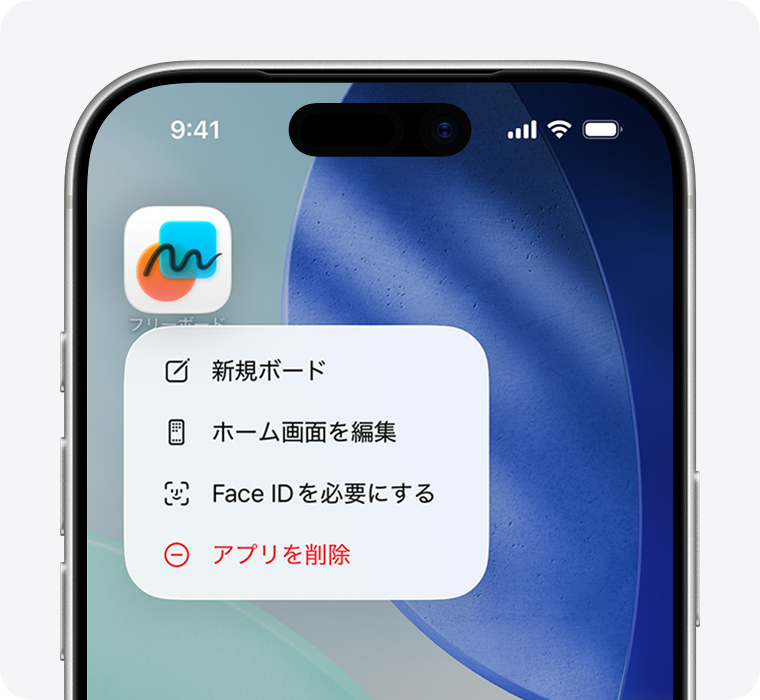
If Delete App is missing
Check Screen Time → Content & Privacy Restrictions → iTunes & App Store Purchases → Deleting Apps. Ask the parent or administrator if they set the restriction; do not bypass it. Some built-in apps cannot be removed.
In Settings → General → VPN & Device Management, check whether the phone is managed. Contact work or school before removing its profile. Removing a profile also removes associated settings, apps and data. If you installed a profile through the suspicious message, record its name and consult Apple support when unsure about removal.
After removal: accounts and unresolved symptoms
Record what changed after removal. If suspicious behaviour continues, ask the manufacturer about the next steps. Before resetting, confirm backup and account recovery with support; reinstalling the same suspect app would recreate the problem.
Official instructions and sources
⚠ And what not to do
- ✕Do not call the "support desk" shown inside the app — it connects you to the scammers
- ✕Do not follow a message demanding payment to unlock the device
- ✕Do not carry on using online banking or card payments until you have confirmed the phone is clean
Who you can call
No area code needed. Connects you to your nearest consumer affairs centre in Japan.
For non-emergency matters. They can also tell you whether it is a criminal case. Call 110 if it is an emergency.
Technical questions about malware infections and unauthorised access.
The phone numbers on this page are services within Japan. If you are elsewhere, contact your national consumer protection agency, your bank or card issuer directly, and your local police non-emergency line — the steps above still apply.
💬 Worth talking about at home today
Something to say at home: "If your phone starts behaving strangely, or keeps showing odd warnings, do not try to fix it yourself — show me first."